One of the most useful things you can do with Claude is hand it a real action instead of just asking for text. Publishing to social media is a perfect example: instead of copying Claude's draft into a dashboard, you can let Claude post it for you. Here is exactly how, in 2026, using a social media MCP server.
Can Claude post to social media?
Not by itself. Out of the box, Claude generates text but has no access to your social accounts. What changes that is the Model Context Protocol (MCP): when you connect a social media MCP server, Claude gains tools it can call to publish on your behalf.
So the accurate answer is: Claude can post to social media once you give it a social media MCP server to work with. After that, you ask in plain language and Claude carries it out.
What you need
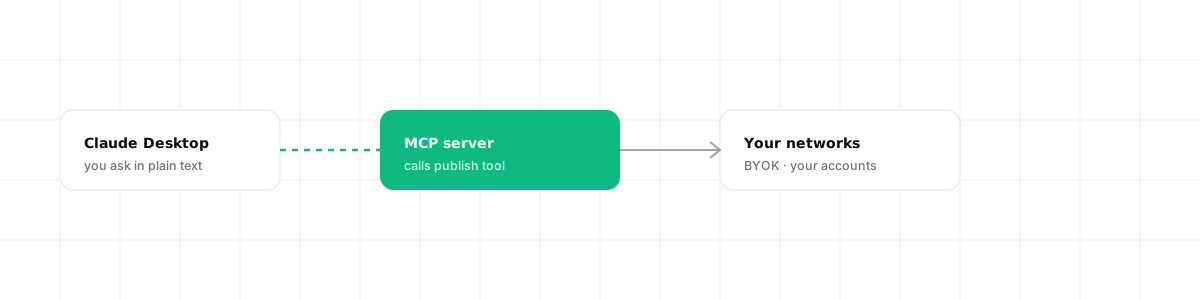
Three things:
- Claude Desktop (or another MCP-compatible client such as Cursor).
- A social media MCP server that exposes publishing tools.
- Your own platform credentials for the networks you want to post to (the BYOK part).
That is it. No custom code if you use a ready MCP server; you are wiring an existing server into Claude.
Step 1: connect a social media MCP server
Claude Desktop loads MCP servers from a config file:
- Windows:
%APPDATA%\Claude\claude_desktop_config.json - Mac:
~/Library/Application Support/Claude/claude_desktop_config.json
On Mac you can open it from Claude via Settings, then Developer, then Edit Config. Add your server under mcpServers:
{ "mcpServers": { "dravo-social": { "command": "npx", "args": ["mcp-remote", "https://mcp.dravo.dev/sse"] } }}Two practical notes the docs stress: use the full path to the executable if a short name like npx fails (Claude Desktop launches with a minimal PATH), and completely quit and restart Claude Desktop after saving, so it loads the new server.
When Claude restarts, it asks the server for its tool list, so the publishing tools become available before you type anything.
Step 2: bring your own keys
A good social media MCP server uses a BYOK (Bring Your Own Keys) model. You connect your own developer apps for Meta, X, LinkedIn and the rest, so Claude publishes on your accounts, with your rate limits and your direct relationship with each platform.
This is a one-time setup per network. After that, the credentials are stored encrypted and used only at publish time. It also means there is no shared vendor app that, if flagged, would take your agent down with everyone else's.
Step 3: just ask Claude to post
With the server connected and your keys in place, you publish by asking:
"Post this to X and LinkedIn: Shipping day on Dravo. Link in bio."
Claude recognizes it has a publishing tool, calls it with your text and target networks, and the MCP server fans the post out. Because posting is asynchronous, Claude can report the job status back to you, and if something fails with a structured error (for example, an image too large), Claude can read the fix and retry without you debugging anything.
That is the whole loop: describe the post, Claude calls the tool, the post goes out.
Why BYOK matters here
When you let an AI agent act on your accounts, ownership is the thing to get right. With BYOK, the keys and the social accounts are yours from the start. If you ever stop using the tool, nothing was rented in your name. And because the agent runs on your own credentials, a problem with one platform's shared infrastructure cannot cascade into your workflow.
How Dravo fits
Dravo is a unified social media API on a BYOK model, built so its actions map onto MCP tools: one publish action fans out to every network, posting is async, and errors are structured so Claude can self-correct. That makes it a natural backend for letting Claude post to social media on your own accounts.
For the concepts behind this, see what an MCP server is and the social media MCP server overview, plus the broader social media API for AI agents guide.
Frequently asked questions
Can Claude post to social media? Claude cannot post on its own, but it can when you connect a social media MCP server. The server exposes publishing as tools Claude can call, so you ask in natural language and it carries out the post across your connected networks.
How do I connect a social media MCP server to Claude? Edit claude_desktop_config.json (Windows: %APPDATA%/Claude/, Mac: ~/Library/Application Support/Claude/), add the server under mcpServers with its command and args, then fully quit and restart Claude Desktop so it loads the new server.
Does Claude posting to social media use my own accounts? With a BYOK setup, yes. You connect your own platform developer credentials, so Claude publishes on your accounts with your rate limits, rather than through a shared vendor app.
Is it safe to let Claude post to social media? It is as safe as the server you connect. Use a BYOK platform so your keys stay yours and are encrypted, review what each tool does, and start with a test account or a self-only post to confirm the flow before going public.