If you have ever tried to publish a post to Instagram from your own code, you already know the official path is not friendly. There is no single "post to Instagram" endpoint you can call with an API key. Instead you go through Meta's Instagram Graph API, with app review, business accounts, access tokens that expire, and a two-step publishing flow. Developers say it out loud on Reddit: "Why is the Instagram Graph API so complicated?"
This guide walks through how the Instagram API actually works in 2026, what you need before you can post, the exact publishing flow, the rate limits that will bite you, and a simpler unified path if you would rather skip the plumbing.
What the Instagram API actually is
There is no standalone "Instagram API" in the way people imagine. What exists is the Instagram Graph API, part of Meta's developer platform. It lets your app publish media, read and reply to comments, fetch basic metrics, and manage messaging, on behalf of Instagram Business and Creator accounts.
Two things follow from that, and they trip up almost everyone:
- It only works with Business or Creator accounts. A personal Instagram account cannot publish through the API. The account also has to be connected to a Facebook Page.
- You publish through Meta's app review system. To post on behalf of users who are not you, your app needs the right permissions approved by Meta.
So "the Instagram API" really means "the Instagram Graph API, accessed through a Meta app, for professional accounts." Keep that framing and the rest makes sense.
Is the Instagram API free?
Yes. Meta does not charge per API call. The Instagram Graph API is free to use.
What is not free is the effort. The cost shows up as rate limits, an app review process, token management, and the time you spend learning Meta's data model. Many teams end up paying a third-party platform precisely to avoid that cost, even though the underlying API is free. So the honest answer is: free in dollars to Meta, expensive in engineering time.
What you need before you can post
Before a single publish call works, you need all of the following in place:
- A Meta app created in the App Dashboard, with the Instagram product added.
- An Instagram Business or Creator account, connected to a Facebook Page.
- A User Access Token with the right permissions, including
instagram_business_content_publishfor posting. - Your Instagram user ID (the professional account's id, which you fetch from the Graph API).
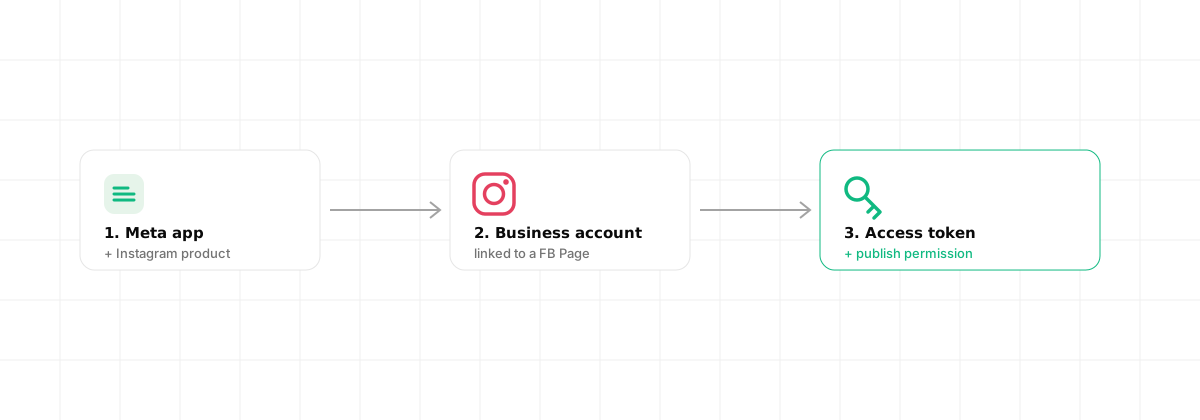
Access tokens are the part people underestimate. Short-lived tokens last about an hour. Long-lived tokens last around 60 days and have to be refreshed before they expire, or your integration silently stops working.
Publishing a post: the two-step flow
Here is the detail that surprises most developers: you do not post in one call. Instagram uses a two-step container flow.
Step 1, create a media container. You send the image URL and caption, and Instagram returns a container id. Note that the media has to be hosted at a public URL first, Instagram pulls it from there.
curl -X POST "https://graph.facebook.com/v25.0/<IG_USER_ID>/media" \
  -d "image_url=https://cdn.example.com/photo.jpg" \
  -d "caption=Shipping day" \
  -d "access_token=<ACCESS_TOKEN>"
# => { "id": "17995..." }   (this is the container id)
Step 2, publish the container. You take that container id and publish it.
curl -X POST "https://graph.facebook.com/v25.0/<IG_USER_ID>/media_publish" \
  -d "creation_id=17995..." \
  -d "access_token=<ACCESS_TOKEN>"
# => { "id": "17896..." }   (the published post id)
For videos and reels you also have to poll the container's status until processing finishes, then publish. Carousels mean creating several child containers first, then one parent container. The pattern scales in complexity quickly, which is why this is the part teams most often want to outsource.
Rate limits you should know about
Two limits matter in practice:
- Content publishing limit. An Instagram account can publish at most 100 API posts in a rolling 24 hour window. A carousel counts as one post.
- Platform rate limits. Calls are also subject to Meta's broader Graph API rate limiting, calculated per app and per user. Hit it and you get throttled.
These are not negotiable at the API level, so design your scheduling around them rather than against them.
The simpler path: a unified API
Everything above is the official route. It works, but you maintain the app, the tokens, the container flow, the polling, and the per-network quirks, and then you do it all again for X, LinkedIn, TikTok and the rest.
A unified social media API collapses that into a short flow, and Dravo runs the two-step container flow, the polling and the retries behind the scenes. There is no media_publish call to chain yourself.
Connect the account once. Redirect the user to the consent URL; Dravo stores and refreshes the token for you.
curl "https://api.dravo.dev/v1/oauth/instagram/start?return_url=https://app.acme.com/connect" \
  -H "Authorization: Bearer $DRAVO_API_KEY"
# => { "authorize_url": "https://api.instagram.com/oauth/authorize?..." }
Ingest the media. Instead of hosting the image yourself and passing a public URL to Instagram, you hand Dravo the file (or a URL to import) once and get back a CDN public_url.
curl -X POST https://api.dravo.dev/v1/media \
  -H "Authorization: Bearer $DRAVO_API_KEY" \
  -H "Content-Type: application/json" \
  -d '{ "source_url": "https://example.com/photo.jpg" }'
# => 201 Created, { "id": "media_8f2c1d", "public_url": "https://cdn.dravo.dev/u/abc/2f1c....jpg", "kind": "image", "status": "ready" }
Publish. One request, targeting the connected account by its acc_… id (list them with GET /v1/accounts). Dravo creates the container, publishes it, and tracks status.
curl -X POST https://api.dravo.dev/v1/posts \
  -H "Authorization: Bearer $DRAVO_API_KEY" \
  -H "Content-Type: application/json" \
  -d '{
    "account_ids": ["acc_8f2c1d"],
    "text": "Shipping day",
    "media_urls": ["https://cdn.dravo.dev/u/abc/2f1c....jpg"]
  }'
# => 202 Accepted, { "id": "post_2a7f93", "status": "queued", "scheduled_at": null }
For a Story or a first comment, add platform_options (for example
{ "instagram": { "story": true } }); Dravo validates the keys against
Instagram's accepted values before it queues the job.
Dravo uses a BYOK (Bring Your Own Keys) model, so you still connect your own Meta app credentials. Your account, your rate limits, your direct relationship with the platform. The difference is that you stop hand-writing the two-step flow and token refreshes, and every error comes back structured so your code (or an AI agent) can act on it. If you want the background on why owning your keys matters, see our guide on white-label social media management. For other platforms with very different access models, compare this with the LinkedIn API, the X (Twitter) API, and the TikTok API, and if you're wiring this into an AI agent, see what an MCP server is.
When you only need Instagram and you enjoy the platform's internals, the Graph API direct is fine. When you want to ship and move on, or you need several networks, the unified path saves real time.
Frequently asked questions
Is the Instagram API free? Yes. Meta's Instagram Graph API is free to use, but it is tightly controlled through rate limits, app review, and access policies. You pay nothing to Meta for API calls, though you may pay a third-party platform if you use one to simplify the integration.
Can you post to a personal Instagram account via the API? No. Content publishing through the Instagram Graph API only works with Instagram Business or Creator accounts that are connected to a Facebook Page. Personal accounts cannot publish through the official API.
How do I get an Instagram API access token?
Create a Meta app in the App Dashboard, add the Instagram product, connect a Business or Creator account, and generate a User Access Token with the required permissions (such as instagram_business_content_publish). Long-lived tokens last about 60 days and can be refreshed.
Why is the Instagram Graph API so complicated? Because publishing is a two-step container flow, accounts must be Business or Creator type linked to a Facebook Page, tokens expire, and permissions require app review. A unified API hides this behind a single request so you do not manage each step yourself.