Few APIs have generated as much developer frustration as the X (Twitter) API. The headlines tell the story: "Twitter API plans are a joke," "posting links on X is now 1,900 percent more costly," and the half-joking "Twitter API used to cost 200 dollars a month, now it's just one install." If you are trying to post to X from code in 2026, you need to know what actually changed.
This guide covers what the X API is today, whether it is still free, the pricing tiers, how to get keys, how to publish a tweet from code, the limits, and a simpler unified path if you would rather not manage it all yourself.
What the X (Twitter) API is now
The X API gives you programmatic access to X's public conversation: read posts, publish content, manage users, and analyze trends through REST endpoints. The current platform is built around consumption-based (pay-per-use) billing on an all-new developer console.
The key thing to understand: this is not the old Twitter API. The legacy access levels were deprecated, pricing was restructured, and write actions (posting) and reads are now metered. Anything you read in a tutorial from before 2024 is likely outdated.
Is the Twitter API free?
Not really, and this changed again in early 2026. As of February 2026, X moved to a pay-per-use model and the free tier is no longer available to new developers. Existing free-tier users were migrated to pay-per-use with a one-time credit voucher.
So the honest answer for anyone starting today: there is no free path. You sign up for pay-per-use, where creating a post costs roughly a cent per request and reads are billed per resource. The old story of a generous free tier is gone.
X API pricing tiers in 2026
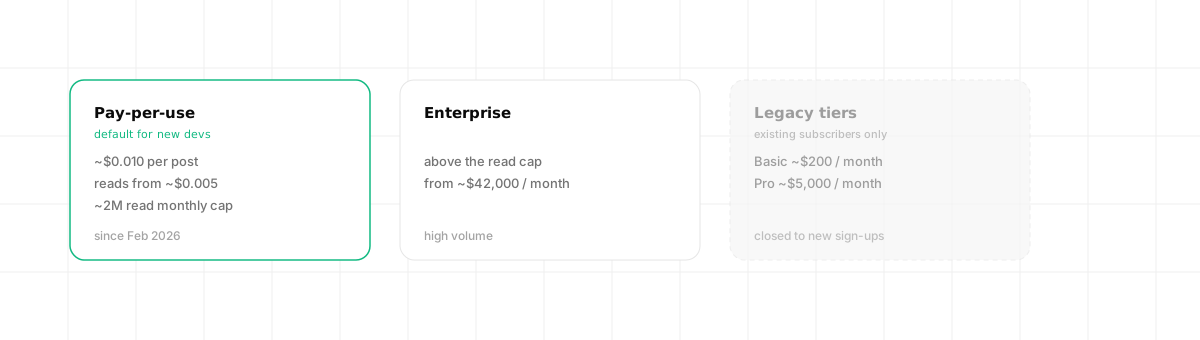
Here is the important nuance most outdated guides miss. X retired the fixed Basic and Pro subscription tiers for new sign-ups. Today your real options are:
- Pay-per-use. The default for new developers since February 2026. Writes cost about $0.010 per post, reads from roughly $0.005 per resource, with a monthly read cap (around 2 million) before you must move up.
- Enterprise. Required above the pay-per-use cap, starting around $42,000 per month.
- Legacy fixed tiers (existing subscribers only). Basic (about $200/month) and Pro (about $5,000/month) still exist for accounts that already had them, but new developers cannot subscribe to them.
The practical takeaway: estimate your write and read volume, then price it against pay-per-use, because that is the only entry point now. Always confirm current rates in the developer portal, since X has changed them more than once.
How to get your X API keys
- Open the X Developer Portal and create a project, then an app inside it.
- Choose an access tier (or move the app to the pay-per-use package). Writes often fail with a "client-forbidden" error if the app is left in the wrong environment.
- Generate your API key and secret, plus an OAuth token. Posting needs write scope.
- Set the redirect URI and move the app to a production environment.
OAuth 2.0 is the modern path; some endpoints still use OAuth 1.0a. Either way, there is no shortcut around the developer portal and tier selection.
Posting a tweet from code
Once your app has write access and a user token, publishing a post uses the v2 endpoint:
curl -X POST "https://api.x.com/2/tweets" \
  -H "Authorization: Bearer <USER_ACCESS_TOKEN>" \
  -H "Content-Type: application/json" \
  -d '{ "text": "Shipping day on Dravo." }'
# => { "data": { "id": "1789...", "text": "Shipping day on Dravo." } }
Posting media is a two-step flow: upload the media first to get a media id, then attach it to the tweet. The hard parts are not the call itself but the auth tiers, the scope setup, and staying within the metered limits.
Rate limits and gotchas
- Tier-bound limits. Your read and write ceilings depend entirely on your plan. Free is tiny.
- Writes can silently 403. If the app is not in a production or pay-per-use package, posts fail with "client-forbidden." This trips up almost everyone.
- Cost scales with volume. Because reads and writes are metered, a feature that polls frequently can get expensive fast. Design around it.
The simpler path: a unified API
The X API itself is workable once configured, but if you publish to X and other networks, you end up maintaining OAuth, tier quirks, media upload, and metered limits for each platform separately.
A unified social media API gives you a short, consistent flow instead of the tier-and-scope maze. With Dravo, it is three calls.
Connect the account once. Ask for a consent URL and redirect the user; after they approve, Dravo stores and auto-refreshes the token.
curl "https://api.dravo.dev/v1/oauth/x/start?return_url=https://app.acme.com/connect" \
  -H "Authorization: Bearer $DRAVO_API_KEY"
# => { "authorize_url": "https://twitter.com/i/oauth2/authorize?..." }
Look up the account id. You publish to an acc_… id, not to raw API keys and tokens.
curl https://api.dravo.dev/v1/accounts?platform=x \
  -H "Authorization: Bearer $DRAVO_API_KEY"
# => { "items": [ { "id": "acc_4b9e07", "platform": "x", "handle": "@dravo", "health": "active" } ], "total": 1 }
Publish. One request; add more ids to fan the same post out to other networks.
curl -X POST https://api.dravo.dev/v1/posts \
  -H "Authorization: Bearer $DRAVO_API_KEY" \
  -H "Content-Type: application/json" \
  -d '{
    "account_ids": ["acc_4b9e07"],
    "text": "Shipping day on Dravo."
  }'
# => 202 Accepted, { "id": "post_2a7f93", "status": "queued", "scheduled_at": null }
Delivery is async, so you read the outcome back from the post afterwards:
curl https://api.dravo.dev/v1/posts/post_2a7f93 \
  -H "Authorization: Bearer $DRAVO_API_KEY"
# => { "id": "post_2a7f93", "status": "published",
#      "results": [ { "account_id": "acc_4b9e07", "platform": "x", "status": "published", "platform_post_id": "1789..." } ] }
One honest point: Dravo uses a BYOK (Bring Your Own Keys) model, so you connect your own X app and X's pricing still applies. Dravo does not make the X API free. What it removes is the integration work: the OAuth setup, the media flow, the per-network quirks, and unreadable errors. Every failure comes back structured so your code (or an AI agent) can act on it. For the reasoning behind owning your keys, see our guide on white-label social media management. For other platforms, compare the Instagram API, LinkedIn API, and TikTok API guides, and if you are wiring this into an agent, see what an MCP server is.
Frequently asked questions
Is the Twitter API free? There is a Free tier, but it is very limited: built for write-only, low-volume use with almost no read access. The legacy Essential and Elevated tiers were deprecated. Meaningful usage requires a paid Basic or Pro plan, or pay-per-use.
How much does the X API cost? X moved to consumption-based pricing with named tiers (Free, Basic, Pro, Enterprise). Costs vary by read and write volume, and posting and reading became significantly more expensive than the old flat plans. Always check current rates before you build.
How do I get X (Twitter) API keys? Create a project and app in the X Developer Portal, choose an access tier, then generate your API key and secret plus an OAuth token with write scope. The app must be in a production or pay-per-use package for writes to work reliably.
Can I post a tweet with the API for free? Yes, within the Free tier's small monthly write allowance. For anything beyond hobby volume you need a paid tier. A unified API still uses your own X credentials (BYOK), so the platform's pricing applies, but you avoid maintaining the integration yourself.