Posting to TikTok from code is doable in 2026, but only through the right door. There is an official Content Posting API, yet developers regularly hit a wall: as one Reddit thread on applying for TikTok API access puts it, people get "rejected" and confused about which API they even need. This guide clears that up: which API to use, whether it is free, the audit that gates everything, the exact three-step posting flow, the limits, and a simpler unified path.
Which TikTok API do you actually need
TikTok exposes several different APIs, and picking the wrong one wastes days. The main ones:
- Content Posting API. Publish videos and photos on behalf of an authenticated creator. This is the one you want for posting.
- Display API. Read a user's public content and profile. Read-only.
- Research API. Academic and research data access, heavily gated.
- TikTok for Business API. Ads and marketing, a separate platform.
- TikTok Shop API. Commerce and storefronts, separate again.
If your goal is "publish a video to TikTok from my app," the Content Posting API is the correct one. Everything below is about that.
Is the TikTok API free?
Yes. TikTok does not charge a per-call fee for the official Content Posting API. As with the other major platforms, the real cost is not money, it is approval.
Your app has to be registered, request the right scopes, and pass an audit before it can post public content. Until then you are limited to private or self-only posts. So the honest framing: free to call, but you pay in process and review time before anything goes live publicly.
Access and the app audit
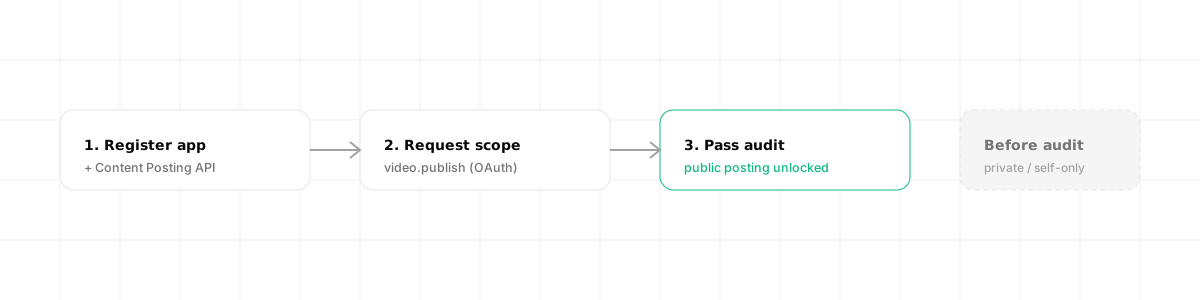
Three things stand between you and a public post:
- Register an app in the TikTok for Developers portal and add the Content Posting API product.
- Request the
video.publishscope (andvideo.uploadif you only need drafts). The user authorizes your app through OAuth. - Pass the app audit. Until your app is audited and approved, posts are forced to private or self-only visibility. This is the step most people miss and then wonder why their videos never appear publicly.
The audit is the TikTok equivalent of LinkedIn's partner review or Instagram's app review: plan for it, do not assume instant public posting.
The three-step direct post flow
Direct posting (publishing straight to the profile) is a three-step, asynchronous flow. You do not get an instant result; you poll for completion.
Step 1, query creator info. This returns the privacy levels and settings allowed for that creator, which you must respect.
curl -X POST "https://open.tiktokapis.com/v2/post/publish/creator_info/query/" \
  -H "Authorization: Bearer <ACCESS_TOKEN>" \
  -H "Content-Type: application/json; charset=UTF-8"
Step 2, initialize the publish. You choose PULL_FROM_URL (TikTok fetches your hosted file) or FILE_UPLOAD (you upload directly). The response gives you a publish_id and, for uploads, an upload_url that expires after one hour.
curl -X POST "https://open.tiktokapis.com/v2/post/publish/video/init/" \
  -H "Authorization: Bearer <ACCESS_TOKEN>" \
  -H "Content-Type: application/json; charset=UTF-8" \
  -d '{
    "post_info": { "title": "Shipping day", "privacy_level": "SELF_ONLY" },
    "source_info": {
      "source": "PULL_FROM_URL",
      "video_url": "https://cdn.example.com/clip.mp4"
    }
  }'
# => { "data": { "publish_id": "v_pub_..." } }
Step 3, poll the status. Publishing is async, so you check until it reports PUBLISH_COMPLETE.
curl -X POST "https://open.tiktokapis.com/v2/post/publish/status/fetch/" \
  -H "Authorization: Bearer <ACCESS_TOKEN>" \
  -H "Content-Type: application/json; charset=UTF-8" \
  -d '{ "publish_id": "v_pub_..." }'
# => { "data": { "status": "PUBLISH_COMPLETE" } }
That is three calls plus an upload, per video, with state to track in between. Useful, but more moving parts than most people expect.
Rate limits and gotchas
- 6 requests per minute per user access token on the posting endpoints. Design your queue around it.
- Upload URLs expire after one hour. Generate them right before uploading, not ahead of time.
- The audit gate. Before approval, everything is private or self-only. This single rule causes most "why is nothing posting publicly" confusion.
- Respect creator privacy settings. The values from the creator info query are not optional; using a disallowed privacy level fails the publish.
The simpler path: a unified API
The TikTok flow is workable, but it is three endpoints, an upload step, async polling, an audit, and per-creator privacy rules. Multiply that by every other network and the maintenance adds up fast.
A unified social media API turns those three endpoints, the upload and the polling into a short flow, and Dravo runs the init-upload-poll dance for you. With Dravo, it is three calls.
Connect the account once. Redirect the creator to the consent URL; Dravo stores and refreshes the token.
curl "https://api.dravo.dev/v1/oauth/tiktok/start?return_url=https://app.acme.com/connect" \
  -H "Authorization: Bearer $DRAVO_API_KEY"
# => { "authorize_url": "https://www.tiktok.com/v2/auth/authorize/?client_key=..." }
Ingest the video. You hand Dravo the clip (or a URL to import) once and get back a CDN public_url instead of managing an expiring upload URL yourself.
curl -X POST https://api.dravo.dev/v1/media \
  -H "Authorization: Bearer $DRAVO_API_KEY" \
  -H "Content-Type: application/json" \
  -d '{ "source_url": "https://example.com/clip.mp4" }'
# => 201 Created, { "id": "media_8f2c1d", "public_url": "https://cdn.dravo.dev/u/abc/clip.mp4", "kind": "video", "status": "ready" }
Publish. One request, targeting the connected account by its acc_… id (list them with GET /v1/accounts). Per-creator settings like privacy_level go in platform_options, which Dravo validates against TikTok's allowed values before queueing.
curl -X POST https://api.dravo.dev/v1/posts \
  -H "Authorization: Bearer $DRAVO_API_KEY" \
  -H "Content-Type: application/json" \
  -d '{
    "account_ids": ["acc_8f2c1d"],
    "text": "Shipping day on Dravo.",
    "media_urls": ["https://cdn.dravo.dev/u/abc/clip.mp4"],
    "platform_options": { "tiktok": { "privacy_level": "SELF_ONLY" } }
  }'
# => 202 Accepted, { "id": "post_2a7f93", "status": "queued", "scheduled_at": null }
Because publishing is async, you read the outcome back from GET /v1/posts/post_2a7f93 once TikTok finishes processing, without writing the status-poll loop yourself.
Dravo uses a BYOK (Bring Your Own Keys) model, so you still connect your own audited TikTok app. Your access, your rate limits, your compliance. What you skip is hand-writing the three-step flow, the upload handling, and the polling, and every error comes back structured so your code (or an AI agent) can act on it. For the reasoning behind owning your keys, see our guide on white-label social media management. For other platforms, compare the Instagram API, LinkedIn API, and X (Twitter) API guides, and if you are wiring this into an agent, see what an MCP server is.
Frequently asked questions
Is the TikTok API free? Yes, TikTok's official Content Posting API is free to call, with no per-request fee. The cost is the approval process: your app must register, request the right scopes, and pass an audit before it can post publicly.
Does TikTok provide an official posting API? Yes. The Content Posting API lets approved apps publish videos and photos on behalf of authenticated creators. There are also the Display API (read), the Research API, and the separate TikTok for Business and TikTok Shop APIs.
How do I post a video to TikTok with the API? Query the creator info endpoint, call /v2/post/publish/video/init/ with PULL_FROM_URL or FILE_UPLOAD, upload or let TikTok pull the file, then poll /v2/post/publish/status/fetch/ until the status is PUBLISH_COMPLETE. It needs the video.publish scope and a passed audit.
What scope do I need to post to TikTok? You need the video.publish scope for direct posting. Before posts can go public rather than to a private draft, your app must pass TikTok's app audit. Until then, content is restricted to private or self-only visibility.