If you have searched for the LinkedIn API, you have probably noticed the pattern: the official docs are everywhere, but actually getting something built is hard. Developers say it bluntly. One viral post sums it up: "LinkedIn: Here's an API endpoint. Founder: how do I use it? LinkedIn: Here's the documentation. Founder: look what I built! LinkedIn: No, that's a terms violation, we'll ban you."
This guide cuts through that. It covers what the LinkedIn API actually is in 2026, why access is so gated, whether it is free, how to get approved, how to publish a post from code, the limits, and a simpler unified path if you would rather not fight the platform.
What the LinkedIn API actually is
There is no single "LinkedIn API." LinkedIn organizes its APIs into business lines, each with its own access rules:
- Consumer. Sign In with LinkedIn (OpenID Connect) and Share on LinkedIn. Available to all developers on a self-serve basis.
- Marketing. Advertising, company pages, and post management. Requires explicit approval.
- Sales and Talent. Sales Navigator (SNAP) and recruiting (ATS) partner programs.
- Data Portability. Authorized access to Page and Member data.
So when someone says "the LinkedIn API," the important follow-up question is: which product, and do you have access to it? Posting to a company page, for example, lives in the Marketing line and is gated.
Why LinkedIn API access is so gated
This is the part that surprises people. Unlike many APIs, most of LinkedIn's useful endpoints are not open. You apply, and you may be rejected.
The reasons are deliberate. LinkedIn protects member data tightly, scraping is explicitly prohibited in the terms of use, and the platform has tightened partner access over the last year. As one developer put it, "accessing the official LinkedIn API is difficult for most companies, even established ones." That is by design, not an accident you can work around.
The practical takeaway: plan for an approval process, write a clear business justification, and only request the permissions you actually need.
Is the LinkedIn API free?
Yes, in the sense that LinkedIn does not charge a per-call fee. The cost is access and effort, not money.
Self-serve consumer features (sign-in, sharing) are free and immediate. The advanced Marketing, Sales, and Talent APIs are also free to call, but you have to be an approved partner first. Many teams end up paying a third-party platform, not because the API costs money, but because getting and maintaining compliant access is the expensive part.
How to get access, step by step
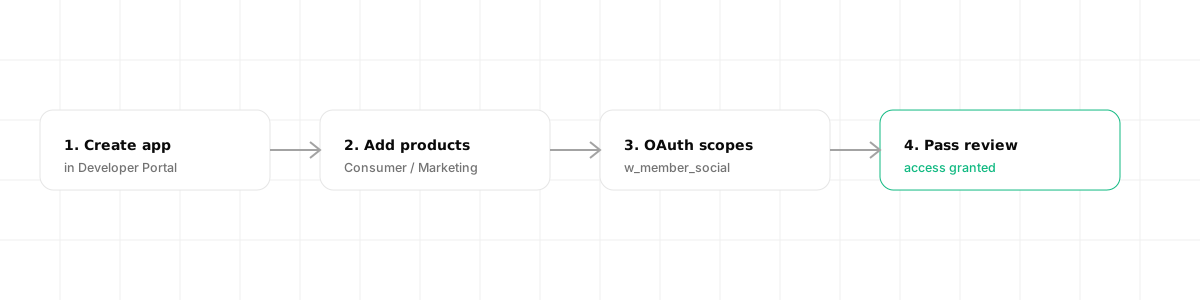
- Create an app in the LinkedIn Developer Portal and associate it with a LinkedIn Company Page you administer.
- Add products on the Products tab. Some are available instantly (Sign In, Share); others show an "apply" flow.
- Request OAuth scopes. Posting needs
w_member_social. Reading profile basics needs the OpenID scopes. - Pass review for gated products, with a description of your use case and how you comply with LinkedIn's terms.
OAuth 2.0 is mandatory. You exchange an authorization code for an access token, and you refresh it before it expires. There is no API-key shortcut.
Posting to LinkedIn from code
Once you have a token with w_member_social, publishing a text post uses the Posts API. You need the author's URN (the member or organization identifier) and the post body.
curl -X POST "https://api.linkedin.com/rest/posts" \
  -H "Authorization: Bearer <ACCESS_TOKEN>" \
  -H "LinkedIn-Version: 202606" \
  -H "X-Restli-Protocol-Version: 2.0.0" \
  -H "Content-Type: application/json" \
  -d '{
    "author": "urn:li:person:<MEMBER_ID>",
    "commentary": "Shipping day on Dravo.",
    "visibility": "PUBLIC",
    "distribution": {
      "feedDistribution": "MAIN_FEED"
    },
    "lifecycleState": "PUBLISHED"
  }'
Posting an image is a two-call flow: you register and upload the image first to get an image URN, then reference it in the post. The URN-based data model and the versioned LinkedIn-Version header are where most first-time integrations stumble.
Rate limits and restrictions
LinkedIn applies per-app and per-member throttling, and the exact ceilings depend on the product tier and your partnership level. Three rules matter in practice:
- Stay within posting limits. Automated mass posting and connection spamming get accounts flagged fast.
- Do not scrape. Pulling data outside approved endpoints violates the terms, even if it is technically possible.
- Only request scopes you use. Over-broad permission requests slow down or sink your review.
The simpler path: a unified API
If your goal is to publish to LinkedIn (and probably other networks too), maintaining the OAuth flow, the URN model, the versioned headers, and the image upload dance for each platform is a lot of plumbing.
A unified social media API collapses it into a short, consistent flow. With Dravo, the whole thing is three calls, and none of them involve URNs or versioned headers.
Connect the account once. You ask for a consent URL and redirect the member to it. After they approve, Dravo stores the token and creates a connected account, refreshing it for you before it expires.
curl "https://api.dravo.dev/v1/oauth/linkedin/start?return_url=https://app.acme.com/connect" \
  -H "Authorization: Bearer $DRAVO_API_KEY"
# => { "authorize_url": "https://www.linkedin.com/oauth/v2/authorization?..." }
Look up the account id. Every connected account has an acc_… id, which is what you publish to (never a raw URN).
curl https://api.dravo.dev/v1/accounts?platform=linkedin \
  -H "Authorization: Bearer $DRAVO_API_KEY"
# => { "items": [ { "id": "acc_8f2c1d", "platform": "linkedin", "handle": "Acme Inc", "health": "active" } ], "total": 1 }
Publish. One request, and you can target several networks at once just by adding more ids.
curl -X POST https://api.dravo.dev/v1/posts \
  -H "Authorization: Bearer $DRAVO_API_KEY" \
  -H "Content-Type: application/json" \
  -d '{
    "account_ids": ["acc_8f2c1d"],
    "text": "Shipping day on Dravo."
  }'
# => 202 Accepted, { "id": "post_2a7f93", "status": "queued", "scheduled_at": null }
Delivery is asynchronous, so you read the per-account outcome back from the post afterwards:
curl https://api.dravo.dev/v1/posts/post_2a7f93 \
  -H "Authorization: Bearer $DRAVO_API_KEY"
# => { "id": "post_2a7f93", "status": "published",
#      "results": [ { "account_id": "acc_8f2c1d", "platform": "linkedin", "status": "published", "platform_post_url": "https://www.linkedin.com/feed/update/urn:li:share:..." } ] }
Dravo uses a BYOK (Bring Your Own Keys) model, so you still connect your own approved LinkedIn app. Your access, your rate limits, your compliance posture. What you skip is hand-writing the URN handling, token refreshes, and per-network quirks, and every error comes back structured so your code (or an AI agent) can act on it. For the reasoning behind owning your keys, see our guide on white-label social media management, and for other platform walk-throughs, the Instagram API guide, the X (Twitter) API guide, and the TikTok API guide. If you're exposing this to an AI agent, our explainer on what an MCP server is covers how the pieces fit together.
Frequently asked questions
Is the LinkedIn API free? The LinkedIn API is free to call: per-request fees do not apply. Basic consumer features like Sign In with LinkedIn and Share on LinkedIn are self-serve. Advanced Marketing, Sales, and Talent APIs are free to use but require an approved partner application, which is the real cost.
Can I get LinkedIn API access? Yes for the self-serve consumer products (sign-in and sharing). For Marketing, Sales Navigator, or Talent APIs you must create an app in the LinkedIn Developer Portal, add the relevant products, and pass a review with business justification. Approval is selective.
How do I post to LinkedIn with the API?
You authenticate with OAuth 2.0, request the w_member_social permission, then call the Posts API with the author URN, the text, and any media. A unified API can do the same with a single request and your own credentials.
Why is the LinkedIn API so difficult to work with? Because most useful endpoints are gated behind partner approval, permissions are tightly scoped, scraping is prohibited, and the data model uses URNs and unusual formats. Developers regularly report that something technically possible is not API-compliant.